Unleash your creativity on the artist way!
Artweaver is a full-featured digital painting software with realistic, predefined brushes combined with essential image editing capabilities - suitable for both beginners and advanced users.
Free download Explore features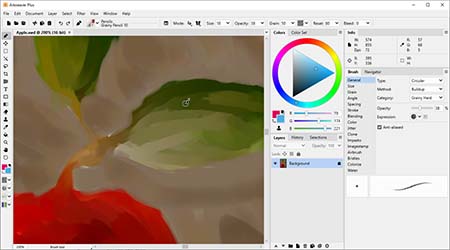
Why Artweaver?
Artweaver is a powerful and configurable digital painting software that also includes essential image editing capabilities.
Realistic Brushes
Artweaver offers a customizable brush engine that authentically simulates a variety of real-world painting tools.
Powerful Core
Artweaver is built on a powerful core that supports a wide range of tools, layers, effect filters, selections, and plugins.
Plus Version
Artweaver is available in two editions: a free version and a paid Plus version that offers additional features.
User Interface
Artweaver offers an intuitive, easy-to-use interface that is fully configurable for a wide range of workflows.
Event Recording
Artweaver records the entire painting process as events, allowing it to be replayed and reviewed at any time.
No Subscription
An Artweaver Plus license is perpetual, time-unlimited, and may be used on all computers owned by the licensee.
What is new in Artweaver 8?
Artweaver 8 reintroduces the brush palette, adds quick-access options for frequently used brush functions, integrates mirror painting directly into the brush tool, improves pen calibration, and includes numerous additional enhancements and new features.
Artweaver Free vs. Artweaver Plus
Artweaver is available in two editions: the Free version and the Plus version, which offers additional features and requires a paid license.
|
Artweaver Plus |
Artweaver Free |
|
|---|---|---|
| Limited functionality | ||
| For private use only | ||
| Free of charge | ||
| Full functionality | ||
| Use without limitations | ||
| No subscription | ||
| Buy | Download |
Get Artweaver now!
Unleash your creativity the artist way with all the tools you need to bring your ideas to life.
Latest News
Artweaver 8.1.6 is available
05.07.2026
An update for Artweaver 8 to version 8.1.6 is now available.You can install this update automatically using the built-in onli...
Read the full articleArtweaver 8 for Mac is out now!
17.06.2026
We are happy to announce the availability of Artweaver 8 for Mac.Artweaver 8 for Mac is the first official macOS version of A...
Read the full articleArtweaver 8.1.5 is available
16.05.2026
An update for Artweaver 8 to version 8.1.5 is now available.You can install this update automatically using the built-in onli...
Read the full article